
Virgin Australia is an airline that serves a vast network of domestic and international destinations, including Bali, Fiji, Queenstown, Vanuatu and Samoa, among others, offering Economy and Business Class cabins.
Booking a flight with this airline may seem simple, but knowing a few key points can help you avoid unpleasant surprises and take advantage of the best deals. Here’s a comprehensive overview of the process.
Steps for booking a Virgin Australia flight online
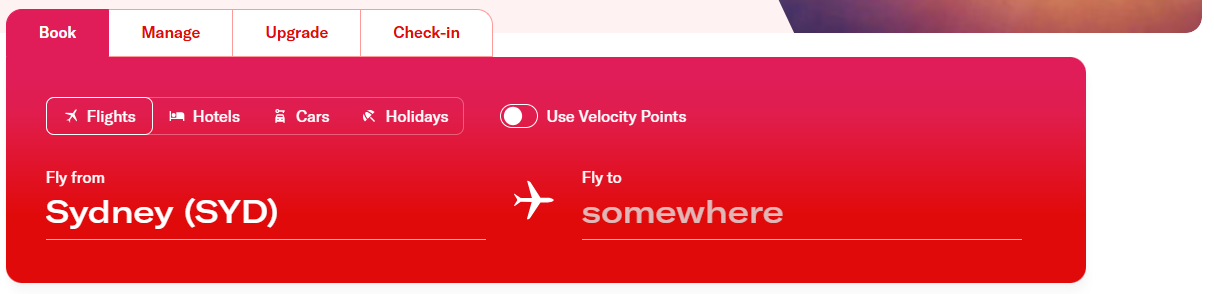
Bookings are primarily made on the official website, virginaustralia.com. Simply enter your departure city, destination, travel dates and the number of passengers to start your search.
The search engine then offers a selection of one-way or round-trip flights and displays fares in real time, sorted by price or schedule. This step also gives you the chance to compare prices across multiple days, as fares can vary significantly from one date to another.
The different fare types offered by Virgin Australia
The price shown depends mainly on the type of fare you choose, each of which has its own terms and conditions:
– Economy Lite: the most economical fare, but also the least flexible. Neither checked baggage nor seat selection is included, and cancellations are not permitted.
– Economy Choice: a balance between price and flexibility.
– Economy Flex: the most flexible option, refundable for a fee.
– Economy X: a mid-range option with more legroom, priority boarding, and reserved space in the overhead bins.
– Business Class: the most comprehensive service, offering premium comfort and amenities recognized by numerous industry awards.
We recommend carefully reading the terms and conditions associated with each fare before confirming payment, particularly regarding baggage and change options.
Customize your reservation with “Manage Booking”
Once your reservation is complete, the “Manage Booking” portal becomes the central tool for managing your trip before heading to the airport. Accessible with your reservation reference and last name, it allows you to:
– View the cabin layout and select a seat;
– Add additional baggage;
– Update your personal information;
– Resend your itinerary via email.
The terms for changes and cancellations depend directly on the fare selected at the time of purchase. Economy Lite and Choice tickets are nonrefundable, while Economy Flex fares allow for cancellation subject to a fee. In all cases, a refund is still possible under the circumstances provided for by Australian consumer law, regardless of the original fare.
Deals and early booking
Booking early remains one of the most reliable ways to get a cheaper ticket. Virgin Australia regularly highlights “book early” offers, flash sales, and promotional fares through its Vmail newsletter, which you can subscribe to for free. The airline also offers flight-and-hotel packages through Virgin Australia Holidays, a convenient way to book your entire trip in one go.
Check-in and baggage
Online check-in opens 48 hours before departure and closes 30 minutes before the scheduled flight time, via the website or mobile app. Self-service kiosks are also available at the airport; you’ll need your six-character reservation reference to print your boarding pass and baggage tags. You must complete check-in and drop off your baggage at least 45 minutes before departure.
For international flights, you’ll generally need to visit the check-in counter to have your travel documents and visas verified; online check-in is often limited for these flights. A new baggage allowance policy, effective February 2026, aims to improve space availability in the baggage holds and reduce delays.
Earn points by joining the Velocity Frequent Flyer program
Virgin Australia operates a loyalty program, Velocity Frequent Flyer, which has over 12 million members. Points earned on flights and with partners can be used to book “Reward Seat” tickets directly on the website by selecting the “Use Points” option during booking. This system allows frequent travelers to reduce—or even eliminate, the cost of a ticket.
Requesting an upgrade
When booking your Virgin Australia flight, the booking tool also offers an upgrade service called UpgradeMe, which allows travelers to access a higher level of comfort (Business Class or Premium Economy, depending on the flight) without necessarily paying the full fare for the higher class. Several options are available:UpgradeMe Premium Bid: You can freely submit a bid to try to secure an upgrade; the airline selects the winning bids based on various criteria.
Upgrade with Velocity Points: Members of the Velocity loyalty program can use their points to upgrade an Economy Choice or Flex ticket to Business Class, subject to availability.
Free Upgrades for Platinum Members: Certain Velocity Platinum members receive free upgrade credits each year.
Upgrades can be requested at any time after booking, up to a few hours before departure, directly through the booking management section on the Virgin Australia website. Please note, however, that availability is limited and that certain baggage, cancellation, or original class change conditions may still apply even after the upgrade.
Booking a Virgin Australia flight by phone
Many travelers look for a phone number to contact Virgin Australia’s customer service in addition to making a reservation—whether for an urgent booking or a last-minute change. Here are Virgin Australia’s official contact channels:
– From Australia: 13 67 89 (Guest Contact Center)
– From New Zealand: 0800 670 000
– From the United States: 1855 253 8021
– From the United Kingdom: 0800 051 1281
– From the United Arab Emirates: 8000 612 002
– From any other country: +61 7 3295 2296.