

Online check-in is one of the most popular features on the Qantas website, and for good reason: It lets you skip the lines at the check-in counters, choose your seat, get your boarding pass in just a few seconds, and even save time at the airport by dropping off your bags directly at the self-service kiosks. Here’s everything you need to know, step by step.
When can you check in online for a Qantas flight?
It is essential to know the check-in deadline for your Qantas flight; otherwise, you may lose your right to board.
Qantas online check-in opens 24 hours before the scheduled departure time and generally closes 60 minutes before takeoff for international flights, and 30 minutes before for domestic Australian flights. These times are approximate: it’s best to check in as soon as check-in opens to have the widest selection of available seats.
Qantas also sends a reminder text message to the phone number on file in your reservation, prompting you to check in. Please make sure your phone number is up to date in the “Manage My Booking” section. → See our guide on managing your Qantas booking.
The 3 ways to check in for your Qantas flight:
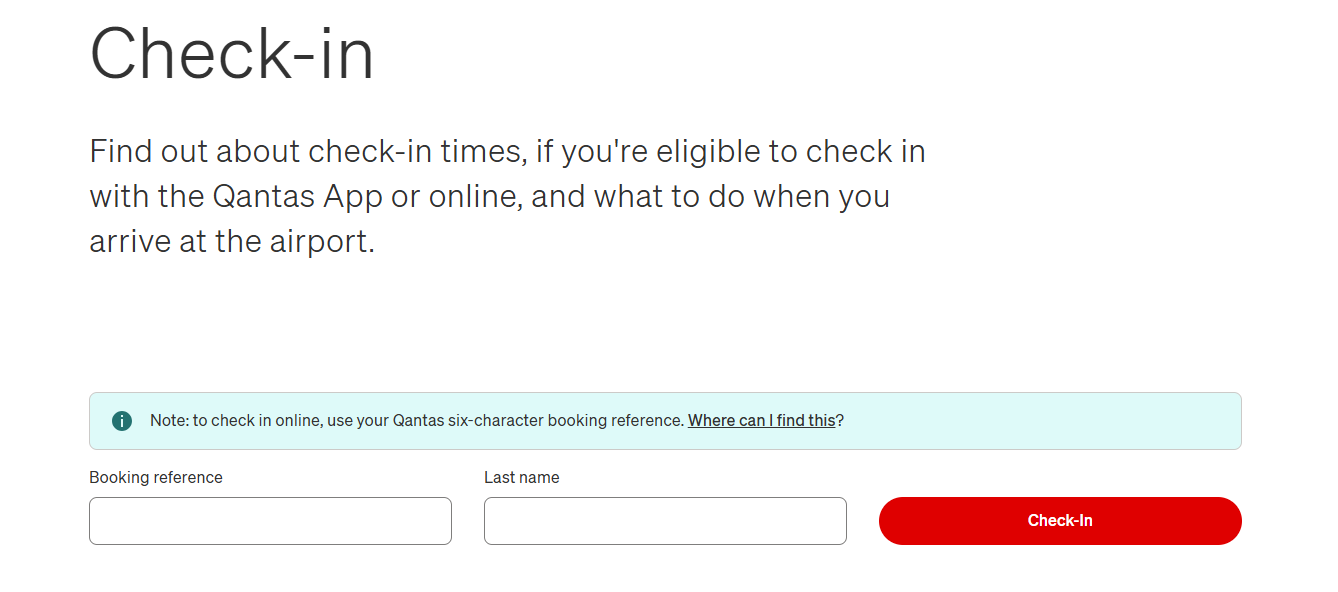
Via the website: Go to qantas.com, enter your six letter booking reference and your last name. Select your seat if you haven’t already, review your travel details, and download your boarding pass as a PDF or add it to your digital wallet (Apple Wallet, Google Pay).
Via the Qantas app: This is the most convenient method. Once you’re logged in, a check-in button appears right on the home screen as your flight approaches. Your boarding pass is available immediately in the app—no printing required. You can also track the status of your checked baggage on eligible flights using the “Track My Bags” feature.
Via airport kiosks: If you were unable to check in online, self-service kiosks are available at Australian airports. They’re now up to twice as fast as older models—printing a baggage tag takes an average of 20 seconds.
You can also purchase additional baggage allowances or check in at these kiosks if you don’t have a smartphone.
What to do after checking in online at the Airport:
If you’re traveling with carry-on luggage only, you can proceed directly to security after checking in online. Your digital boarding pass is all you need.
If you have checked baggage, here’s what to do depending on the airport:
On Australian domestic flights: After checking in online, go to one of the kiosks to print your baggage tags.
Attach them to your bags and drop them off at one of the self-service bag drop kiosks, without waiting in line at the counters. The entire process is designed to take less than five minutes.
On international flights: If you checked in online from Australia, proceed to the designated baggage drop-off counter for pre-checked-in passengers. From Hong Kong or Singapore, you may be able to drop off your luggage at a location other than the airport the day before departure on certain flights—please inquire when making your reservation.
Seat selection at check-In:
If you did not select a seat when booking, online check-in is your last chance to do so for free or at a reduced cost. Qantas Frequent Flyer members with Gold, Platinum, and Platinum One status have access to preferred seats as soon as check-in opens. Silver members can access certain reserved seats starting 24 hours before departure. For passengers without status, the choice is often limited to remaining seats, which is why it’s best to select a seat in advance when booking. → Learn more about the benefits of the Qantas Frequent Flyer Program.
Priority check-in for premium passengers:
Qantas first-class passengers and Platinum One members check in at dedicated counters. Gold and Silver members of the loyalty program, as well as passengers traveling in business class and premium economy, have access to “Premium Service” counters with separate, priority lines. At major airports such as Sydney-Kingsford Smith (SYD), Melbourne-Tullamarine (MEL), and Brisbane (BNE), these counters effectively allow you to avoid waiting in line during peak hours.
Passengers traveling on Qantas within Australia can take advantage of priority check-in if they are traveling in Business Class or hold Silver, Gold, Platinum, or Platinum One status.
This service is also available to Qantas Club members and passengers with Oneworld Emerald, Sapphire, or Ruby status.
Canceling a check-in you’ve already completed:
Have you changed your mind or made a mistake while checking in online? You can cancel your check-in directly from the Qantas app or on the airline’s website, as long as you haven’t checked your bags yet and there are more than 40 minutes until departure. From your boarding pass in the app, tap “More Flight” to start the process.
If your flight includes connections, the cancellation applies to the entire trip—it’s not possible to cancel just one leg of the journey.
Frequently Asked Questions about Qantas check-In:
Q: My smartphone is out of battery – what should I do?
A: Go to a self-service kiosk or the check-in counter to print a paper boarding pass.
Q: Can I check in multiple passengers at the same time?
A: Yes, online check-in allows you to check in up to 9 passengers simultaneously on the same reservation. For groups of 10 or more, check-in must be done at the counter.
Q: What time zone is used for the 24-hour window before the flight?
A: The 24-hour window is calculated based on the local time at the departure airport, not on your personal time zone or the time zone of your place of residence. We recommend checking the local time at the airport before attempting to check in.
Q: My itinerary includes a connecting flight with another airline (code-share) – which airline should I check in with?
A: Generally, you must check in with the airline that issued the first segment of your ticket, not necessarily with Qantas. If your booking reference doesn’t work on the Qantas website, contact customer service to obtain the corresponding reference from the operating carrier.
Q: My flight is operated by a partner airline – can I still check in online?
A: It depends on the operator: if your ticket is issued by Qantas (QF flight number) but operated by a partner airline, check the terms and conditions on the Qantas website or contact Qantas customer service.
Q: Can I check in for all segments of a trip with multiple stopovers at once?
A: It depends on the airlines involved and the type of ticket. For a flight operated entirely by Qantas, end-to-end check-in is generally possible. However, with codeshare partners, each segment may require a separate check-in.
Q: I’ve checked in online, but I haven’t received my boarding pass – should I be concerned?
A: Not really. This often means that additional document verification is required (visa, entry authorization for the destination country). Simply go to the check-in counter before boarding: your boarding pass will be issued after your documents have been verified.
Q: I can’t check in online before arriving at the airport (tight schedule, hotel, etc.)—what are my options?
A: Some airports offer early check-in options outside of regular counter hours, such as dedicated lounges or check-in kiosks in the city (for example, in Hong Kong and Singapore).Feel free to inquire about the specific options available at your departure airport.